

Mojura for JavaScript
A modular architecture pattern for building scalable, maintainable, and readable JavaScript/TypeScript applications.
Inspired by Mojura Architecture — originally a Laravel package by InnoAya.
This is the official JavaScript/TypeScript implementation with framework adapters.
Packages
| Package | Description | Status |
|---|---|---|
@mojura/core |
Framework-agnostic base classes (Feature, Job, QueueableJob) | ✅ Ready |
@mojura/adonisjs |
AdonisJS v7 adapter with Ace CLI commands & stubs | ✅ Ready |
@mojura/nestjs |
NestJS adapter (planned) | 🔮 Future |
@mojura/express |
Express adapter (planned) | 🔮 Future |
Architecture
Route → Controller → Feature → Job(s) → Response- Controller: Ultra-thin — only calls
serve(Feature) - Feature: Orchestrates validation, Job execution, and response building
- Job: Single-responsibility business logic — no HTTP concerns
- QueueableJob: Background task dispatched via
runInQueue()
Quick Start (AdonisJS)
# Install
pnpm add @mojura/core @mojura/adonisjs

# Configure
node ace configure @mojura/adonisjs

# Scaffold a module
node ace mojura:module auth

# Generate components
node ace mojura:feature LoginUser auth
node ace mojura:job AuthenticateUser auth
node ace mojura:validator LoginUser auth
node ace mojura:controller auth auth
Core Principles
- Feature serves a Single Purpose — favor many focused features over complex ones
- Job executes a Single Responsibility — keep business logic concise and flat
- Modules shouldn't cross — each module is self-contained
- Apply Decoupling Techniques — use shared utilities for cross-cutting concerns
- Features shall not call other Features — run Jobs, never Features
- Jobs shall not call other Jobs — avoid nesting and coupling
License
Credits
- Architecture concept by InnoAya
- JavaScript implementation adapts the pattern for modern JS frameworks
Overview
Mojura is a modular architecture designed for scalability, maintainability, and readability in JavaScript/TypeScript applications.
The Problem
As applications grow, traditional MVC patterns lead to:
- Fat controllers with hundreds of lines of mixed validation, business logic, and response handling
- Tightly coupled services that become impossible to test in isolation
- Unclear separation of concerns — where does validation end and business logic begin?
The Solution
Mojura introduces a clear 4-layer request pipeline:
Route → Controller → Feature → Job(s) → ResponseEach layer has a single, well-defined responsibility:
| Layer | Responsibility | Contains |
|---|---|---|
| Route | Map URL to handler | URL patterns, middleware |
| Controller | Dispatch to Feature | One-line serve() calls |
| Feature | Orchestrate the request | Validation, Job orchestration, response building |
| Job | Execute business logic | Single-responsibility pure logic |
Why Mojura?
Scalability
Each module (auth, transactions, merchants) is self-contained with its own controllers, features, jobs, and validators. New team members can work on one module without understanding the entire codebase.
Maintainability
When a bug is reported in transaction processing, you know exactly where to look:
TransactionModule/features/CreateTransactionFeature.ts— orchestrationTransactionModule/jobs/ValidatePaymentJob.ts— the actual logic
Readability
// What does this controller do? It serves the LoginUser feature.
// That's it. No guessing, no scrolling.
export default class AuthController extends MojuraController {
  async login() {
    return this.serve(LoginUserFeature)
  }
}
Packages
| Package | Purpose |
|---|---|
@mojura/core |
Framework-agnostic base classes — works everywhere |
@mojura/adonisjs |
AdonisJS v7 adapter with CLI commands |
Concept
The Request Pipeline
Every request in Mojura flows through a strict 4-layer pipeline:
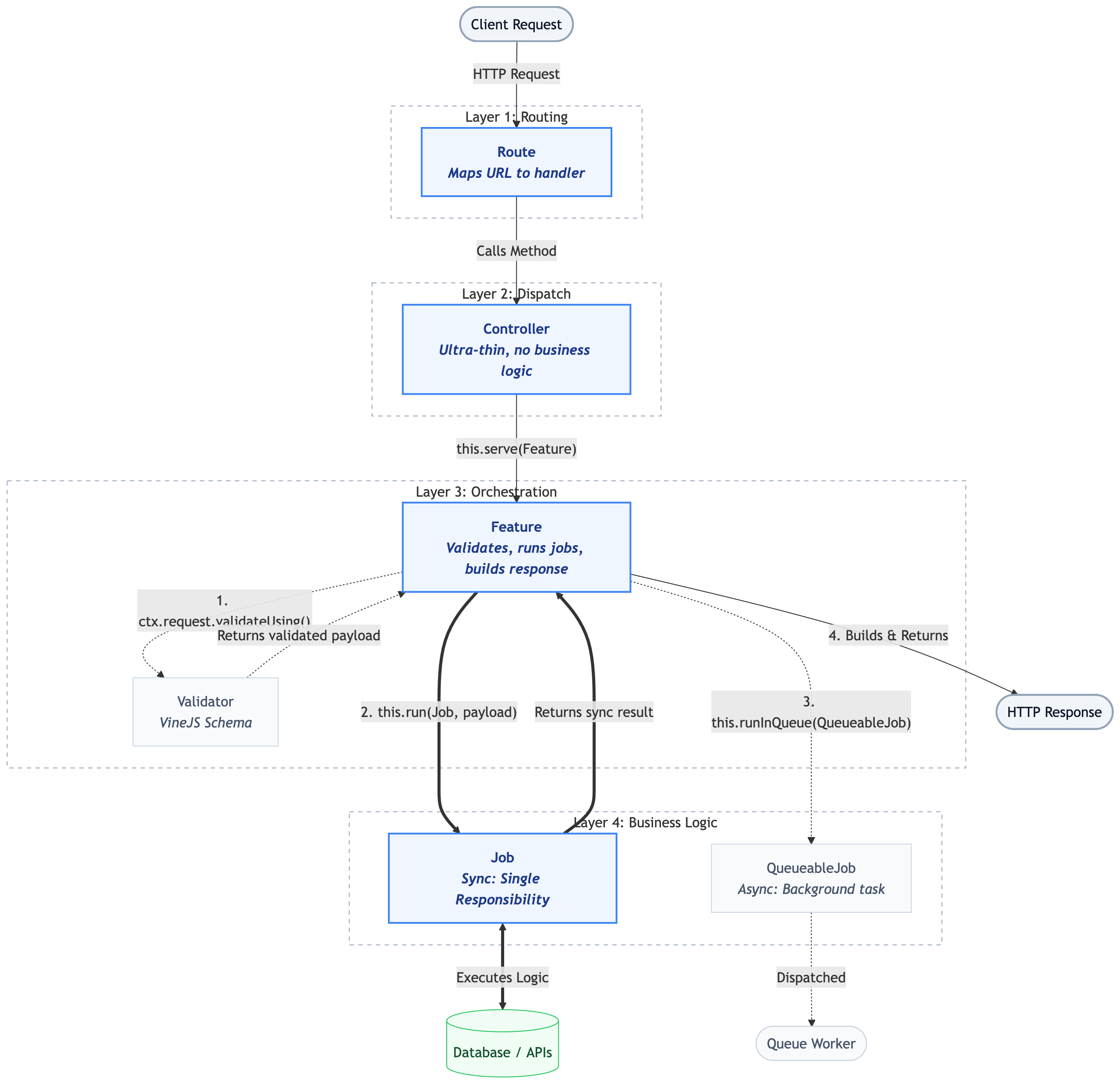
Layer Details
Route
Maps a URL + HTTP method to a Controller method. No logic here — just wiring.
// start/routes/auth.ts
import router from '@adonisjs/core/services/router'
const AuthController = () => import('#modules/auth/controllers/auth_controller')

router.group(() => {
  router.post('/login', [AuthController, 'login'])
  router.post('/logout', [AuthController, 'logout'])
}).prefix('/api/v1/auth')
Controller
Ultra-thin dispatch layer. Each method calls serve() with exactly one Feature.
Rules:
- Controllers NEVER contain business logic
- Controllers NEVER validate requests
- Controllers ONLY call
serve()
import { MojuraController } from '@mojura/adonisjs'
import LoginUserFeature from '../features/login_user_feature.js'
import LogoutUserFeature from '../features/logout_user_feature.js'

export default class AuthController extends MojuraController {
  async login() {
    return this.serve(LoginUserFeature)
  }

  async logout() {
    return this.serve(LogoutUserFeature)
  }
}
Feature
The orchestration layer. A Feature:
- Validates the incoming request
- Runs one or more synchronous Jobs via
run() - Dispatches optional async Jobs via
runInQueue() - Returns the HTTP response
import { Feature } from '@mojura/core'
import type { HttpContext } from '@adonisjs/core/http'
import AuthenticateUserJob from '../jobs/authenticate_user_job.js'
import GenerateTokenJob from '../jobs/generate_token_job.js'
import NotifyLoginJob from '../jobs/notify_login_job.js'
import { loginValidator } from '../validators/auth_validator.js'

export default class LoginUserFeature extends Feature {
  async handle(ctx: HttpContext) {
    // 1. Validate
    const payload = await ctx.request.validateUsing(loginValidator)

    // 2. Run sync Jobs
    const user = await this.run(AuthenticateUserJob, { ...payload })
    const token = await this.run(GenerateTokenJob, { userId: user.id })

    // 3. Dispatch async Job (non-blocking)
    await this.runInQueue(NotifyLoginJob, { userId: user.id, ip: ctx.request.ip() })

    // 4. Return response
    return ctx.response.ok({
      message: 'Logged in successfully',
      data: { access_token: token, user },
    })
  }
}
Job
The business logic unit. Each Job has a single responsibility.
Rules:
- Jobs contain NO HTTP concerns (no request, no response)
- Jobs receive data through constructor params
- Jobs return data (or throw errors)
- Jobs do NOT call other Jobs
import { Job } from '@mojura/core'
import User from '#models/user'
import hash from '@adonisjs/core/services/hash'

export default class AuthenticateUserJob extends Job {
  constructor(private params: { identifier: string; password: string }) {
    super()
  }

  async handle(): Promise {
    const user = await User.query()
      .where('email', this.params.identifier)
      .orWhere('username', this.params.identifier)
      .firstOrFail()

    const isValid = await hash.verify(user.password, this.params.password)
    if (!isValid) {
      throw new Error('Invalid credentials')
    }

    return user
  }
}
QueueableJob
For tasks that should run in the background (emails, notifications, reports).
import { QueueableJob } from '@mojura/core'

export default class NotifyLoginJob extends QueueableJob {
  static queue = 'notifications'
  static attempts = 3

  constructor(private params: { userId: string; ip: string }) {
    super()
  }

  async handle(): Promise {
    // Send notification email, log audit event, etc.
  }
}
Principles
These six principles are the foundation of Mojura Architecture. Follow them strictly to maintain scalability, maintainability, and readability.
1. Feature Serves a Single Purpose
Each Feature handles exactly one use case. Favor creating many focused Features over complicating a single one.
✅ Good:
LoginUserFeature
LogoutUserFeature
ChangePasswordFeature
ForgotPasswordFeature
❌ Bad:
AuthFeature ← handles login, logout, password change, forgot password2. Job Executes a Single Responsibility
Each Job does one thing. A single responsibility can involve multiple related functions as long as they're part of the same cohesive responsibility.
✅ Good:
class AuthenticateUserJob extends Job {
  // Finds user and verifies password — one responsibility
}

class GenerateTokenJob extends Job {
  // Creates and returns an access token — one responsibility
}
❌ Bad:
class LoginAndSendEmailJob extends Job {
  // Authenticates AND sends email — two responsibilities
}
3. Modules Shouldn't Cross
Each module should be self-contained and should not perform tasks that belong to other modules.
✅ Good:
AuthModule handles authentication
TransactionModule handles transactions
MerchantModule handles merchant CRUD
❌ Bad:
// Inside AuthModule
import { CreateTransactionJob } from '../transactions/jobs/...'
// AuthModule is reaching into TransactionModule
For shared logic, use utility classes, helpers, or shared services outside of any module.
4. Apply Decoupling Techniques
Use shared utility and helper classes for cross-cutting concerns. This enhances code reusability and maintainability.
app/
├── modules/          ← Domain-specific logic
│   ├── auth/
│   └── transactions/
├── services/         ← Shared services (crypto, audit, notification)
├── utils/            ← Utility functions (date helpers, formatters)
└── helpers/          ← Helper functions
5. Features Shall Not Call Other Features
A Feature can run as many Jobs as needed, but it must never call another Feature.
✅ Good:
class CreateUserFeature extends Feature {
  async handle(ctx) {
    const user = await this.run(CreateUserJob, { ... })
    await this.run(AssignDefaultRoleJob, { userId: user.id })
    await this.runInQueue(SendWelcomeEmailJob, { ... })
    return ctx.response.created({ data: user })
  }
}
❌ Bad:
class CreateUserFeature extends Feature {
  async handle(ctx) {
    const user = await this.run(CreateUserJob, { ... })
    await this.serve(SendWelcomeEmailFeature)  // ← WRONG! Feature calling Feature
  }
}
6. Jobs Shall Not Call Other Jobs
Keep your business logic concise and flat. Avoid nesting and coupling hell.
✅ Good:
// Feature orchestrates multiple Jobs
class ProcessPaymentFeature extends Feature {
  async handle(ctx) {
    const validated = await this.run(ValidatePaymentJob, { ... })
    const transaction = await this.run(CreateTransactionJob, { ... })
    await this.run(UpdateBalanceJob, { ... })
    return ctx.response.ok({ data: transaction })
  }
}
❌ Bad:
// Job calling another Job
class CreateTransactionJob extends Job {
  async handle() {
    const transaction = await Transaction.create(...)
    const balance = new UpdateBalanceJob({ ... })  // ← WRONG!
    await balance.handle()
  }
}
7. Write Code That Humans Can Read
"Machines will run it nonetheless, it is us who will suffer."
- Use descriptive names:
CreateTransactionFeature, notTxnFeat - Follow the Naming Convention
- Keep files small and focused
- Add JSDoc comments for complex business logic
Naming Convention
Consistent naming for files and classes ensures clarity and human readability.
Classes (PascalCase)
| Component | Pattern | Examples |
|---|---|---|
| Module | [Subject] |
auth, transactions, merchants |
| Controller | [Subject]Controller |
AuthController, TransactionsController |
| Feature | [Operation][Subject]Feature |
LoginUserFeature, CreateTransactionFeature,
ListMerchantsFeature |
| Job | [Operation][Subject]Job |
AuthenticateUserJob, CreateTransactionJob,
CalculateMDRJob |
| Validator | [operation][Subject]Validator |
loginUserValidator, createTransactionValidator |
Files (snake_case)
| Component | Pattern | Examples |
|---|---|---|
| Controller | [subject]_controller.ts |
auth_controller.ts, transactions_controller.ts |
| Feature | [operation]_[subject]_feature.ts |
login_user_feature.ts, create_transaction_feature.ts |
| Job | [operation]_[subject]_job.ts |
authenticate_user_job.ts, create_transaction_job.ts |
| Validator | [subject]_validator.ts |
auth_validator.ts, transaction_validator.ts |
Module Directories (snake_case)
app/modules/
├── auth/                    ← not "Auth" or "AuthModule"
├── transactions/            ← not "Transaction" or "TransactionModule"
├── merchants/
├── payment_channels/        ← use underscores for multi-word names
└── application_credentials/
CRUD Operations
For standard CRUD operations, use these verbs consistently:
| Operation | Feature Name | Job Name |
|---|---|---|
| List | ListUsersFeature |
QueryUsersJob |
| Show | ShowUserFeature |
FindUserJob |
| Create | CreateUserFeature |
CreateUserJob |
| Update | UpdateUserFeature |
UpdateUserJob |
| Delete | DeleteUserFeature |
DeleteUserJob |
Custom Operations
For domain-specific operations, use descriptive verbs:
| Operation | Feature Name | Job Name |
|---|---|---|
| Login | LoginUserFeature |
AuthenticateUserJob |
| Process Payment | ProcessPaymentFeature |
CreateTransactionJob |
| Trigger Callback | TriggerCallbackFeature |
SendCallbackJob |
| Calculate MDR | CalculateMDRFeature |
ComputeMDRRateJob |
Directory Structure
AdonisJS Project with Mojura
your-project/
├── app/
│   ├── modules/                          ← Mojura modules
│   │   ├── auth/
│   │   │   ├── controllers/
│   │   │   │   └── auth_controller.ts
│   │   │   ├── features/
│   │   │   │   ├── login_user_feature.ts
│   │   │   │   ├── logout_user_feature.ts
│   │   │   │   └── change_password_feature.ts
│   │   │   ├── jobs/
│   │   │   │   ├── authenticate_user_job.ts
│   │   │   │   ├── generate_token_job.ts
│   │   │   │   └── revoke_token_job.ts
│   │   │   └── validators/
│   │   │       └── auth_validator.ts
│   │   │
│   │   ├── transactions/
│   │   │   ├── controllers/
│   │   │   │   └── transactions_controller.ts
│   │   │   ├── features/
│   │   │   │   ├── list_transactions_feature.ts
│   │   │   │   ├── show_transaction_feature.ts
│   │   │   │   └── trigger_callback_feature.ts
│   │   │   ├── jobs/
│   │   │   │   ├── query_transactions_job.ts
│   │   │   │   ├── find_transaction_job.ts
│   │   │   │   └── send_callback_job.ts
│   │   │   └── validators/
│   │   │       └── transaction_validator.ts
│   │   │
│   │   ├── merchants/
│   │   │   ├── controllers/
│   │   │   ├── features/
│   │   │   ├── jobs/
│   │   │   └── validators/
│   │   │
│   │   └── settings/
│   │       ├── controllers/
│   │       ├── features/
│   │       ├── jobs/
│   │       └── validators/
│   │
│   ├── models/                           ← Shared Lucid models
│   │   ├── user.ts
│   │   ├── transaction.ts
│   │   └── merchant.ts
│   │
│   ├── middleware/                        ← Shared middleware
│   │   ├── auth_middleware.ts
│   │   └── ability_middleware.ts
│   │
│   ├── services/                         ← Shared services (cross-module)
│   │   ├── crypto_service.ts
│   │   └── audit_service.ts
│   │
│   ├── exceptions/                       ← Custom exceptions
│   │   └── handler.ts
│   │
│   └── utils/                            ← Utility functions
│       └── helpers.ts
│
├── config/                               ← Application config
│   ├── app.ts
│   ├── auth.ts
│   └── database.ts
│
├── database/                             ← Migrations & seeders
│   ├── migrations/
│   └── seeders/
│
├── start/                                ← Bootstrap files
│   ├── routes/
│   │   ├── auth.ts
│   │   ├── transactions.ts
│   │   └── merchants.ts
│   ├── kernel.ts
│   └── env.ts
│
├── types/                                ← Shared TypeScript types
│   └── enum.ts
│
├── adonisrc.ts
├── tsconfig.json
├── package.json
└── .env
Key Principles
Models are Shared
Models live outside modules in app/models/ because multiple modules may reference the
same model (e.g., both auth and transactions need the User
model).
Services are Shared
Cross-cutting services (crypto, audit, notification) live in app/services/ — not inside
any module.
Routes are Per-Module
Route files in start/routes/ map 1:1 to modules for easy navigation.
Each Module Has 4 Directories
Every module follows the same structure:
module_name/
├── controllers/    ← Ultra-thin controllers
├── features/       ← Request orchestration
├── jobs/           ← Business logic units
└── validators/     ← VineJS validation schemas
Setup
Installation
AdonisJS v7
# Install packages
pnpm add @mojura/core @mojura/adonisjs

# Configure the AdonisJS adapter
node ace configure @mojura/adonisjs
The configure command will:
- Register
@mojura/adonisjs/mojura_providerin youradonisrc.ts - Register
@mojura/adonisjs/commandsfor Ace CLI - Create the
app/modules/directory
Manual Configuration
If you prefer manual setup, add to your adonisrc.ts:
import { defineConfig } from '@adonisjs/core/app'

export default defineConfig({
  providers: [
    // ... other providers
    () => import('@mojura/adonisjs/mojura_provider'),
  ],
  commands: [
    // ... other commands
    () => import('@mojura/adonisjs/commands'),
  ],
})
Creating Your First Module
# Scaffold the complete module
node ace mojura:module auth
This creates:
app/modules/auth/
├── controllers/.gitkeep
├── features/.gitkeep
├── jobs/.gitkeep
└── validators/.gitkeep
Available CLI Commands
| Command | Description | Example |
|---|---|---|
mojura:module |
Create a full module scaffold | node ace mojura:module auth |
mojura:controller |
Create a controller in a module | node ace mojura:controller auth auth |
mojura:feature |
Create a feature in a module | node ace mojura:feature LoginUser auth |
mojura:job |
Create a job in a module | node ace mojura:job AuthenticateUser auth |
mojura:job --queue |
Create a queueable job | node ace mojura:job SendEmail auth --queue |
mojura:validator |
Create a validator in a module | node ace mojura:validator LoginUser auth |
Full Example: Auth Module
# 1. Create the module
node ace mojura:module auth

# 2. Create the controller
node ace mojura:controller auth auth

# 3. Create features
node ace mojura:feature LoginUser auth
node ace mojura:feature LogoutUser auth

# 4. Create jobs
node ace mojura:job AuthenticateUser auth
node ace mojura:job GenerateToken auth
node ace mojura:job RevokeToken auth

# 5. Create validator
node ace mojura:validator LoginUser auth
Result:
app/modules/auth/
├── controllers/
│   └── auth_controller.ts
├── features/
│   ├── login_user_feature.ts
│   └── logout_user_feature.ts
├── jobs/
│   ├── authenticate_user_job.ts
│   ├── generate_token_job.ts
│   └── revoke_token_job.ts
└── validators/
    └── login_user_validator.ts
Controller
Generate
node ace mojura:controller <name> <module> [--force]node ace mojura:controller auth auth
# → app/modules/auth/controllers/auth_controller.tsImplementation
Controllers in Mojura are ultra-thin. They extend MojuraController and
use the serve() method to delegate to Features.
import { MojuraController } from '@mojura/adonisjs'
import LoginUserFeature from '../features/login_user_feature.js'
import LogoutUserFeature from '../features/logout_user_feature.js'
import ChangePasswordFeature from '../features/change_password_feature.js'
import GetProfileFeature from '../features/get_profile_feature.js'
import UpdateProfileFeature from '../features/update_profile_feature.js'

export default class AuthController extends MojuraController {
  async login() {
    return this.serve(LoginUserFeature)
  }

  async logout() {
    return this.serve(LogoutUserFeature)
  }

  async changePassword() {
    return this.serve(ChangePasswordFeature)
  }

  async profile() {
    return this.serve(GetProfileFeature)
  }

  async updateProfile() {
    return this.serve(UpdateProfileFeature)
  }
}
Rules
- One Feature per method — each controller method calls
serve()once - No business logic — controllers do not validate, query, or transform data
- No direct response building — the Feature handles the response
The serve() Method
serve() instantiates the given Feature class and calls its handle() method
with the current AdonisJS HttpContext.
// What serve() does internally:
protected async serve(FeatureClass) {
  const feature = new FeatureClass()
  return await feature.handle(this.ctx)
}
Static serveWith()
For functional route handlers (without class controllers), use
MojuraController.serveWith():
import router from '@adonisjs/core/services/router'
import { MojuraController } from '@mojura/adonisjs'
import HealthCheckFeature from '#modules/system/features/health_check_feature'

router.get('/health', (ctx) => MojuraController.serveWith(HealthCheckFeature, ctx))
Feature
Generate
node ace mojura:feature <name> <module> [--force]node ace mojura:feature LoginUser auth
# → app/modules/auth/features/login_user_feature.tsImplementation
A Feature extends Feature<HttpContext> from @mojura/core and
implements the handle() method.
Basic Feature
import { Feature } from '@mojura/core'
import type { HttpContext } from '@adonisjs/core/http'
import CreateUserJob from '../jobs/create_user_job.js'
import { createUserValidator } from '../validators/user_validator.js'

export default class CreateUserFeature extends Feature {
  async handle(ctx: HttpContext) {
    // 1. Validate
    const payload = await ctx.request.validateUsing(createUserValidator)

    // 2. Run Job
    const user = await this.run(CreateUserJob, { ...payload })

    // 3. Return response
    return ctx.response.created({
      message: 'User created successfully',
      data: user,
    })
  }
}
Feature with Multiple Jobs
import { Feature } from '@mojura/core'
import type { HttpContext } from '@adonisjs/core/http'
import AuthenticateUserJob from '../jobs/authenticate_user_job.js'
import GenerateTokenJob from '../jobs/generate_token_job.js'
import NotifyLoginJob from '../jobs/notify_login_job.js'
import { loginValidator } from '../validators/auth_validator.js'

export default class LoginUserFeature extends Feature {
  async handle(ctx: HttpContext) {
    const payload = await ctx.request.validateUsing(loginValidator)

    // Run multiple Jobs sequentially
    const user = await this.run(AuthenticateUserJob, {
      identifier: payload.identifier,
      password: payload.password,
    })

    const token = await this.run(GenerateTokenJob, {
      userId: user.id,
    })

    // Dispatch async Job (non-blocking)
    await this.runInQueue(NotifyLoginJob, {
      userId: user.id,
      ip: ctx.request.ip(),
    })

    return ctx.response.ok({
      message: 'Logged in successfully',
      data: { access_token: token, user },
    })
  }
}
Feature with Error Handling
import { Feature } from '@mojura/core'
import type { HttpContext } from '@adonisjs/core/http'
import AuthenticateUserJob from '../jobs/authenticate_user_job.js'

export default class LoginUserFeature extends Feature {
  async handle(ctx: HttpContext) {
    try {
      const payload = await ctx.request.validateUsing(loginValidator)
      const data = await this.run(AuthenticateUserJob, { ...payload })

      return ctx.response.ok({ message: 'Success', data })
    } catch (error) {
      if (error.message === 'Invalid credentials') {
        return ctx.response.unauthorized({ message: error.message })
      }
      throw error // Let the global exception handler handle it
    }
  }
}
The run() Method
const result = await this.run(SomeJob, { key: 'value' })- Instantiates
SomeJobwith the provided params - Calls
job.handle()and returns the result - Runs synchronously — waits for completion
The runInQueue() Method
await this.runInQueue(SomeQueueableJob, { key: 'value' })
await this.runInQueue(SomeQueueableJob, { key: 'value' }, { delay: 5000, queue: 'emails' })- Dispatches the job to a background queue
- Non-blocking — does not wait for completion
- Requires a Queue Adapter to be configured
- Optional third parameter for queue-specific options
Rules
- Single purpose — one Feature handles one use case
- Features shall NOT call other Features
- Validation happens here — not in controllers or jobs
- Response building happens here — not in jobs
Job
Generate
# Synchronous Job
node ace mojura:job <name> <module> [--force]

# Queueable (async) Job
node ace mojura:job <name> <module> --queue [--force]
node ace mojura:job AuthenticateUser auth
# → app/modules/auth/jobs/authenticate_user_job.ts
node ace mojura:job SendWelcomeEmail auth --queue
# → app/modules/auth/jobs/send_welcome_email_job.ts (QueueableJob)Synchronous Job
A Job extends Job<T> from @mojura/core where T is the
return type.
import { Job } from '@mojura/core'
import User from '#models/user'
import hash from '@adonisjs/core/services/hash'

export default class AuthenticateUserJob extends Job {
  constructor(private params: { identifier: string; password: string }) {
    super()
  }

  async handle(): Promise {
    const user = await User.query()
      .where('email', this.params.identifier)
      .orWhere('username', this.params.identifier)
      .firstOrFail()

    const isValid = await hash.verify(user.password, this.params.password)
    if (!isValid) {
      throw new Error('Invalid credentials')
    }

    return user
  }
}
Queueable Job
A QueueableJob extends QueueableJob from @mojura/core. It runs in the
background.
import { QueueableJob } from '@mojura/core'
import mail from '@adonisjs/mail/services/main'

export default class SendWelcomeEmailJob extends QueueableJob {
  static queue = 'emails'
  static attempts = 3
  static delay = 0

  constructor(private params: { email: string; name: string }) {
    super()
  }

  async handle(): Promise {
    await mail.send((message) => {
      message
        .to(this.params.email)
        .subject('Welcome!')
        .htmlView('emails/welcome', { name: this.params.name })
    })
  }
}
Using Jobs in Features
Synchronous Job via run()
// Creates job instance and awaits handle()
const user = await this.run(AuthenticateUserJob, {
  identifier: 'john@example.com',
  password: 'secret',
})
Async Job via runInQueue()
// Dispatches to background queue — non-blocking
await this.runInQueue(SendWelcomeEmailJob, {
  email: user.email,
  name: user.name,
})

// With custom options
await this.runInQueue(SendReminderEmailJob, { userId: user.id }, {
  delay: 3600000, // 1 hour delay
  queue: 'low-priority',
  attempts: 5,
})
Job Design Patterns
Database Operations
export default class CreateTransactionJob extends Job {
  constructor(private params: {
    amount: number
    currency: string
    merchantId: string
  }) { super() }

  async handle(): Promise {
    return await Transaction.create({
      amount: this.params.amount,
      currency: this.params.currency,
      merchantId: this.params.merchantId,
      status: 'pending',
    })
  }
}
External API Calls
export default class VerifyPaymentWithProviderJob extends Job {
  constructor(private params: { transactionId: string; provider: string }) {
    super()
  }

  async handle(): Promise {
    const response = await fetch(`https://api.provider.com/verify`, {
      method: 'POST',
      body: JSON.stringify({ txn: this.params.transactionId }),
    })
    return await response.json()
  }
}
Computation
export default class CalculateMDRJob extends Job {
  constructor(private params: { amount: number; channelId: string }) {
    super()
  }

  async handle(): Promise {
    const mdrRule = await MdrRule.query()
      .where('channel_id', this.params.channelId)
      .where('is_active', true)
      .firstOrFail()

    const fee = this.params.amount * (mdrRule.rate / 100)
    return { fee, rate: mdrRule.rate, net: this.params.amount - fee }
  }
}
Rules
- Single Responsibility — one thing per Job
- No HTTP concerns — no request/response objects
- Jobs shall NOT call other Jobs — keep it flat
- Throw errors for failures — let the Feature handle them
- Return data — synchronous Jobs return their result
Validator
Generate
node ace mojura:validator <name> <module> [--force]node ace mojura:validator LoginUser auth
# → app/modules/auth/validators/login_user_validator.tsImplementation
Validators use VineJS — AdonisJS's validation library. They export compiled validation schemas used inside Features.
Basic Validator
import vine from '@vinejs/vine'

export const loginUserValidator = vine.compile(
  vine.object({
    identifier: vine.string().trim().minLength(1),
    password: vine.string().minLength(6),
  })
)
CRUD Validators
import vine from '@vinejs/vine'

/**
 * Create merchant validator
 */
export const createMerchantValidator = vine.compile(
  vine.object({
    name: vine.string().trim().minLength(1).maxLength(255),
    email: vine.string().email(),
    phone: vine.string().trim().optional(),
    status: vine.enum(['active', 'inactive']),
  })
)

/**
 * Update merchant validator
 */
export const updateMerchantValidator = vine.compile(
  vine.object({
    name: vine.string().trim().minLength(1).maxLength(255).optional(),
    email: vine.string().email().optional(),
    phone: vine.string().trim().optional().nullable(),
    status: vine.enum(['active', 'inactive']).optional(),
  })
)

/**
 * Filter/search validator for listing
 */
export const listMerchantsValidator = vine.compile(
  vine.object({
    page: vine.number().positive().optional(),
    perPage: vine.number().positive().max(100).optional(),
    search: vine.string().trim().optional(),
    status: vine.enum(['active', 'inactive', 'all']).optional(),
    sortBy: vine.string().optional(),
    sortOrder: vine.enum(['asc', 'desc']).optional(),
  })
)
Using Validators in Features
import { Feature } from '@mojura/core'
import type { HttpContext } from '@adonisjs/core/http'
import CreateMerchantJob from '../jobs/create_merchant_job.js'
import { createMerchantValidator } from '../validators/merchant_validator.js'

export default class CreateMerchantFeature extends Feature {
  async handle(ctx: HttpContext) {
    // Validate request data using the compiled validator
    const payload = await ctx.request.validateUsing(createMerchantValidator)

    // payload is now fully typed and validated
    const merchant = await this.run(CreateMerchantJob, { ...payload })

    return ctx.response.created({
      message: 'Merchant created',
      data: merchant,
    })
  }
}
Where Validation Happens
In Mojura, validation happens in the Feature layer — not in controllers or jobs:
Controller  → No validation (just serves Feature)
Feature     → ✅ Validates here (using VineJS)
Job         → No validation (receives pre-validated data)
This keeps the responsibility chain clean:
- Controller: dispatch
- Feature: validate + orchestrate
- Job: execute business logic